

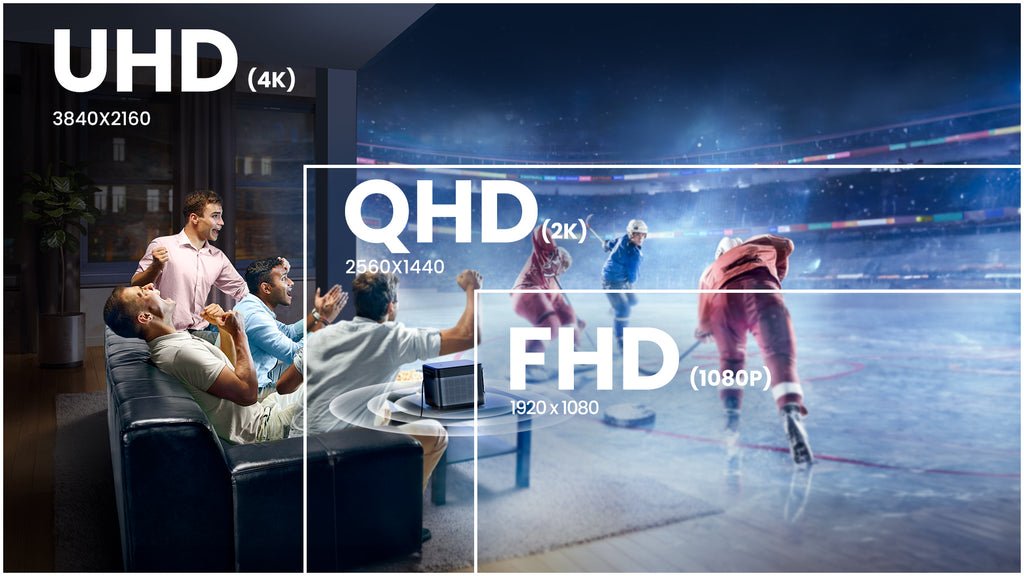
FHD vs QHD – a common dilemma for tech enthusiasts looking for the best display quality. In a nutshell, FHD (Full HD) offers a resolution of 1920×1080 pixels, while QHD (Quad HD) boasts a higher resolution of 2560×1440 pixels. Your choice between FHD and QHD can significantly impact your viewing experience, whether it’s gaming, watching videos, or simply browsing the web. Let’s dive into the details to help you make an informed decision.

FHD vs QHD: Exploring the Key Differences
Welcome to our in-depth comparison of Full HD (FHD) and Quad HD (QHD) displays! In today’s tech-savvy world, understanding the differences between these two popular display resolutions is essential when choosing the right device for your needs. Whether you’re shopping for a new smartphone, tablet, laptop, or monitor, knowing the advantages and drawbacks of FHD and QHD can help you make an informed decision. Let’s dive into the world of high-definition displays and see how FHD and QHD stack up against each other.
What is FHD?
First, let’s talk about Full HD (FHD), which refers to a display resolution of 1920 x 1080 pixels. This resolution is commonly found in a wide range of devices, from smartphones and tablets to laptops and TVs. FHD provides crisp and clear images with vibrant colors, making it a popular choice for everyday use.
Benefits of FHD
One of the main advantages of FHD is its widespread availability. Most devices on the market today come with FHD displays, offering a good balance between image quality and battery life. Whether you’re watching videos, browsing the web, or playing games, FHD displays deliver a seamless viewing experience.
Battery Life
Since FHD displays have fewer pixels compared to higher resolutions like QHD, they consume less power, resulting in better battery life for your device. This makes FHD ideal for users who prioritize longer battery runtime over ultra-high resolution.
Drawbacks of FHD
While FHD displays offer excellent performance for most tasks, they may not be ideal for users who demand the highest level of detail and clarity. If you’re a content creator, graphic designer, or a gamer looking for ultra-sharp visuals, you may find FHD lacking in terms of pixel density.
What is QHD?
Now, let’s shift our focus to Quad HD (QHD), also known as 1440p, which boasts a resolution of 2560 x 1440 pixels. QHD displays provide a significant upgrade in clarity and detail compared to FHD, making them a popular choice for professionals and enthusiasts who demand top-notch visual quality.
Advantages of QHD
One of the standout features of QHD displays is their exceptional sharpness and clarity. With more pixels packed into the screen, QHD delivers images and videos with incredible detail, allowing you to see every nuance and texture with precision.
Pixel Density
QHD displays have a higher pixel density than FHD displays, resulting in sharper text and graphics. This makes QHD ideal for tasks that require fine details, such as photo editing, video production, and reading small text on the screen.
Drawbacks of QHD
While QHD offers superior image quality, it also comes with some trade-offs. One of the main drawbacks of QHD displays is their impact on battery life. Due to the higher pixel count, QHD displays consume more power, which can lead to quicker battery drain compared to FHD displays.
Choosing Between FHD and QHD
When deciding between FHD and QHD displays, consider your primary use case and preferences. If you value longer battery life and a good overall viewing experience, FHD may be the right choice for you. On the other hand, if you prioritize crystal-clear visuals and enhanced productivity, QHD could be the perfect fit.
Ultimately, the decision between FHD and QHD boils down to your specific needs and how you plan to use your device. Both display resolutions have their own set of advantages and drawbacks, so weigh your options carefully before making a purchase.
In conclusion, the debate between FHD and QHD displays is a matter of personal preference and usage requirements. While FHD offers a reliable and energy-efficient viewing experience, QHD raises the bar in terms of clarity and detail. Whether you opt for FHD or QHD, rest assured that both display resolutions can provide an immersive and enjoyable visual experience for your everyday tasks.
Thank you for joining us on this journey through the world of FHD and QHD displays. We hope this guide has helped you gain a better understanding of the key differences between these two popular display resolutions. Happy browsing and may your screen always be filled with stunning visuals!
FHD vs QHD vs 4K – Monitor Resolution Comparison Between 1080p, 1440p & 2160p
Frequently Asked Questions
What are the differences between FHD and QHD displays?
FHD (Full High Definition) displays have a resolution of 1920 x 1080 pixels, while QHD (Quad High Definition) displays offer a higher resolution of 2560 x 1440 pixels. This means that QHD displays have more pixels, resulting in a sharper and clearer image quality compared to FHD displays.
How does the resolution affect the viewing experience on FHD and QHD displays?
The higher resolution of QHD displays allows for finer details to be displayed on the screen, making images and text appear crisper and more detailed. This results in a more immersive and visually satisfying viewing experience compared to FHD displays.
Are there any advantages to choosing a QHD display over an FHD display?
One of the main advantages of opting for a QHD display over an FHD display is the improved clarity and sharpness of images and text. QHD displays also provide better color accuracy and a more detailed viewing experience, making them ideal for tasks that require high visual precision, such as photo editing or graphic design.
Final Thoughts
In conclusion, when comparing FHD vs QHD displays, the differences lie in resolution and pixel density. FHD provides a standard high-definition viewing experience, suitable for most users. On the other hand, QHD offers greater sharpness and detail, ideal for graphic designers and multimedia enthusiasts. Consider your usage needs and budget to make the best choice between FHD and QHD displays.